GROUND IMMUNE Guard — Technical Preview
Separate what the AI decides
from what it's allowed to do.
When an AI agent proposes an operation, Guard checks whether it's within the granted authority, and whether the conditions and evidence required to run it are in place. It makes allow, deny, and hold explicit — a verifiable boundary between the AI's decision and its execution.
Why it matters
Giving an AI a job is not the same as giving it unlimited authority to act.
IMMUNE Guard checks each operation an AI proposes against explicit permissions and evidence.
When an AI agent makes a mistake, it can still act on it. A flawed plan, a prompt injection, or a plain bug can trigger operations that run with whatever permissions the agent already has.
Typical content guardrails
They inspect what an AI takes in and puts out: detecting or limiting dangerous prompts and responses.
IMMUNE Guard's focus
It judges what an AI is allowed to execute: the target, the allowed scope, the required evidence, and whether the thing about to run still matches the admitted operation.
These address different risks. Neither is better, and other tools also control execution.
How operations are judged
IMMUNE Guard evaluates each proposed operation and returns one of three verdicts.
Diagram description. Operations leaving the agent are judged by IMMUNE Guard. ADMITTED (in allowed scope, may execute) passes through Guard and reaches the files, APIs, or repos. UNRESOLVED (required evidence missing, on hold) stops at Guard and blinks there; it is not treated as an allow. DENIED (out of scope, denied) reaches Guard and is marked with an ×. It does not go around by another path. Actual blocking applies only in LIMITED_BLOCKING. In the default SHADOW mode, Guard only records the verdict.
For example, if an AI is only allowed to update docs/ and it tries to create an out-of-scope .env, IMMUNE Guard returns DENIED. When the runtime honors that verdict, the unauthorized operation doesn't run.
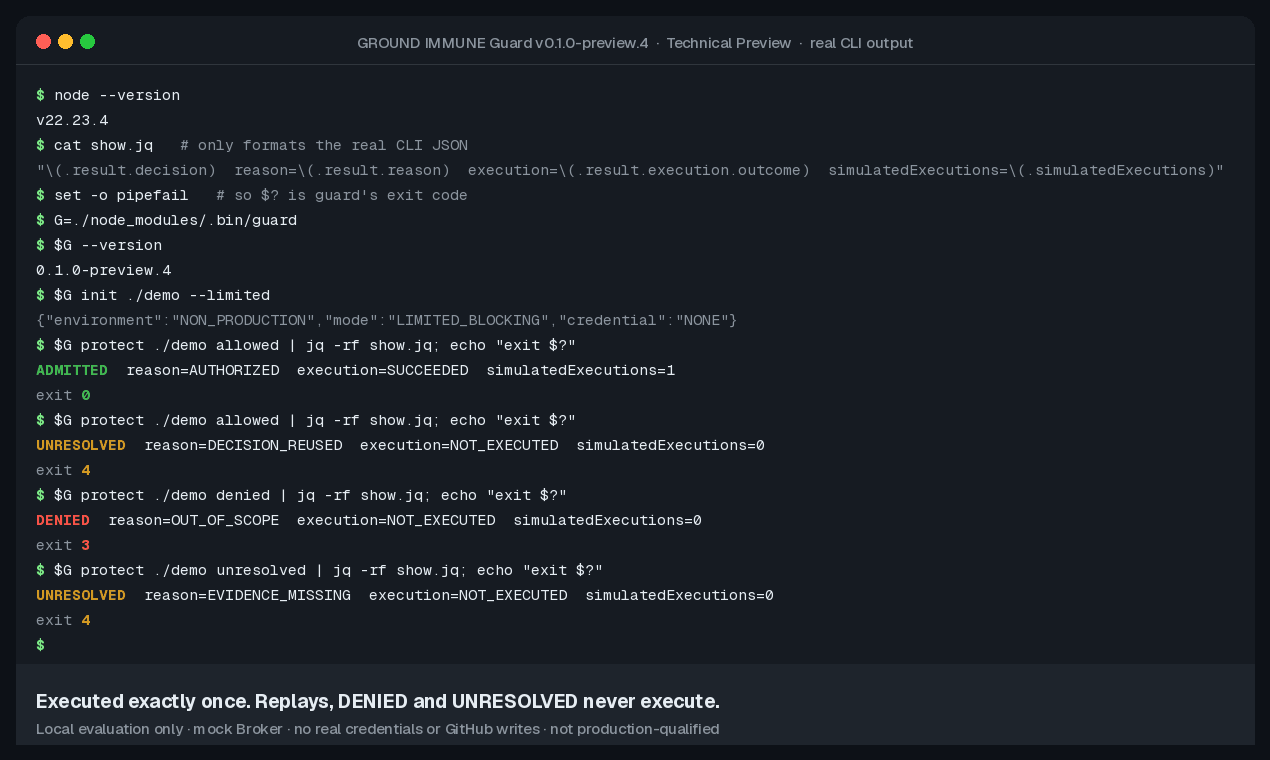
What's demonstrated today
This is the current scope of the Technical Preview, and you can verify it on GitHub. It isn't just a concept.
- The three verdicts — ADMITTED, DENIED, and UNRESOLVED — and CLI examples are available.
- There's an example that returns UNRESOLVED and doesn't run the operation if it's swapped out after admission.
- Verified on Linux, Windows 11, and macOS (Apple Silicon).
- We publish a runnable distribution, the public source, validation records, and the limitations.
The default SHADOW mode only observes. LIMITED_BLOCKING is limited blocking with a mock Broker. This is not a proof of production safety. See LIMITATIONS and the validation record for v0.1.0-preview.4.
Try it yourself
No account or credentials required. After you download it, you can try it offline. Requires Node.js 22 or later. This is a Technical Preview. Steps are in the Quickstart.